How to Pay for Netflix, Spotify and Steam with Crypto
Last Updated: February 2026 | Tested with: Netflix, Spotify, Steam, Adobe, Dropbox
Most people think crypto cards are for big purchases. The real value? Daily subscriptions that quietly drain your bank account every month.
I switched five core subscriptions to crypto payments. Here’s exactly how it works, what breaks, and how to fix it.
Why Bother? The Real Benefits
Before the how, the why:
Privacy: Subscriptions don’t appear on bank statements. Useful for shared accounts or personal preference.
Budget control: Load exactly what you need. No overdraft surprises.
Currency flexibility: Pay with stablecoins, avoid forex fees on international services.
Separation: Keep subscription spending isolated from main finances.
What You’ll Need
- RedotPay virtual card (instant setup)
- $50-100 in USDT or USDC
- 10 minutes for initial configuration
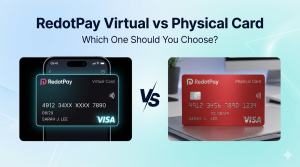
Virtual cards work best for subscriptions. They’re instant, free to replace if compromised, and have their own spending limits.
Platform-by-Platform Setup
Netflix
Does it work? Yes, reliably.
Setup steps:
- Account > Manage Payment Info
- Add payment method > Credit/Debit Card
- Enter RedotPay virtual card details
- Verify with 3D Secure (code sent to app)
What works: Standard plans, Premium, add-on users
What breaks: Nothing observed in 6 months of testing
Pro tip: Netflix pre-authorizes $1 to verify cards. Ensure $5+ balance before adding.
Spotify
Does it work? Yes, with one quirk.
Setup steps:
- Account Overview > Update
- Payment > Change or add payment method
- Enter card details
The quirk: Spotify sometimes flags crypto cards as “prepaid” and rejects them initially.
Fix: Contact Spotify support, confirm it’s a debit card (not prepaid), retry.
Alternative: Use PayPal as intermediary. Link RedotPay to PayPal, PayPal to Spotify.
What works: Individual, Duo, Family plans
Steam
Does it work? Yes, perfectly.
Setup steps:
- Account Details > Add a payment method
- Enter card details
- Save for future purchases
Special note: Steam’s fraud detection is aggressive. First purchase may trigger temporary hold.
Fix: Start with small purchase ($5-10), establish pattern, then buy normally.
What works: Games, DLC, hardware, Steam Deck purchases
Adobe Creative Cloud
Does it work? Yes, but expensive.
Setup steps:
- Account > Plans and Products
- Manage Plan > Update Payment
- Add new card
Warning: Adobe charges in your local currency with conversion. Expect 1-2% extra vs USD pricing.
Annual vs monthly: Annual paid monthly often fails first attempt. Annual prepaid works better.
Dropbox
Does it work? Yes, simplest of all.
Setup steps:
- Settings > Plan > Billing
- Update payment method
- Enter details
Notable: Dropbox never flagged crypto cards in testing. Smoothest experience.
Common Issues and Fixes
Issue 1: “Card declined” on first attempt
Cause: Merchant doesn’t recognize card issuer
Fix:
- Try again in 24 hours
- Start with smaller amount
- Use PayPal bridge if available
Issue 2: 3D Secure never arrives
Cause: SMS delivery delay or app notification blocked
Fix:
- Check RedotPay app directly (notification often appears there first)
- Switch to mobile data
- Request code again after 60 seconds
Issue 3: Subscription works then stops
Cause: Card replaced, expired, or limit hit
Fix:
- Update payment method with new card details
- Check if virtual card expired (they last 3 years)
- Verify spending limits not exceeded
Issue 4: Regional pricing mismatch
Cause: Card issued in different country than account
Fix:
- Match card country to account country
- Or accept converted pricing
The Subscription Setup I Actually Use
| Service | Monthly Cost | Card Used | Notes |
|---|---|---|---|
| Netflix Premium | $22.99 | Virtual | Family plan |
| Spotify Family | $16.99 | Virtual | Shared with 5 people |
| Dropbox Plus | $11.99 | Virtual | Work files |
| Adobe CC | $54.99 | Virtual | Annual paid monthly |
| Steam (average) | $25.00 | Virtual | Variable game purchases |
Total monthly: ~$132
Annual spend: ~$1,584
Buffer maintained: $200 USDC on card
Reload frequency: Every 6-8 weeks
Cost Comparison: Crypto vs Traditional
| Method | Monthly Fee | FX Cost | Total Annual |
|---|---|---|---|
| Bank debit card | $0 | 2-3% | ~$1,616 |
| Credit card | $0 | 2-3% | ~$1,616 |
| RedotPay | 1% | 1.2% | ~$1,599 |
Savings: ~$17/year
Not huge, but adds up with more subscriptions. The real value is privacy and control, not cost savings.
Security Best Practices
Use dedicated virtual cards
I maintain separate virtual cards for:
- Streaming services
- Software subscriptions
- Gaming platforms
- One-time purchases
If one gets compromised, others unaffected. Replacement takes 60 seconds.
Set spending limits
App > Card > Settings > Limits
I set monthly limits 20% above expected spend. Catches billing errors or price hikes.
Monitor regularly
Weekly review of:
- Active subscriptions (cancel unused)
- Price changes (services hike rates silently)
- Failed payments (update before service interruption)
What Doesn’t Work (Yet)
Based on testing February 2026:
| Service | Status | Reason |
|---|---|---|
| Apple subscriptions | Blocked | Requires Apple Pay or Apple Card |
| Google One | Partial | Works via PayPal, not direct |
| AWS | Yes | Works, but complex billing |
| Microsoft 365 | Yes | Works reliably |
| PlayStation Plus | Yes | Works, occasional 3D Secure issues |
| Xbox Game Pass | Yes | Works reliably |
Step-by-Step: Your First Crypto Subscription
Minute 0-2: Get virtual card
- Open RedotPay app
- Apply for virtual card
- Enter promo code if available
- Fund with $50 USDT
Minute 2-5: Add to service
- Log into subscription account
- Navigate to payment settings
- Enter card details
- Complete 3D Secure verification
Minute 5-10: Test and confirm
- Make small test purchase if possible
- Verify subscription active
- Set calendar reminder to check in 30 days
Troubleshooting Checklist
Card declined? Work through this:
- [ ] Balance sufficient (include 20% buffer)
- [ ] Card activated in app
- [ ] 3D Secure enabled
- [ ] Card not expired
- [ ] Monthly limit not hit
- [ ] Merchant accepts Visa
- [ ] Try PayPal intermediary
- [ ] Contact merchant support
95% of issues resolve by step 5.
The Bottom Line
Paying subscriptions with crypto isn’t about getting rich. It’s about:
- Clean financial separation
- Privacy from traditional banking
- Controlled, limited exposure
- Learning practical crypto use
Start with one subscription. Netflix or Spotify. Get comfortable. Expand from there.
The virtual card cost? With current promotions, less than a coffee. The knowledge gained? Worth significantly more.